
As case study
Wholesale Digital Aggregator
Turning 2,700+ messy listings from eight Telegram seller bots into a managed catalogue of 74 products, with stock and margins that look after themselves. Planned and built solo for DigitaVision.
Role
Product Manager · Solo build
Timeline
Jul 2026 — Present
Status
Live
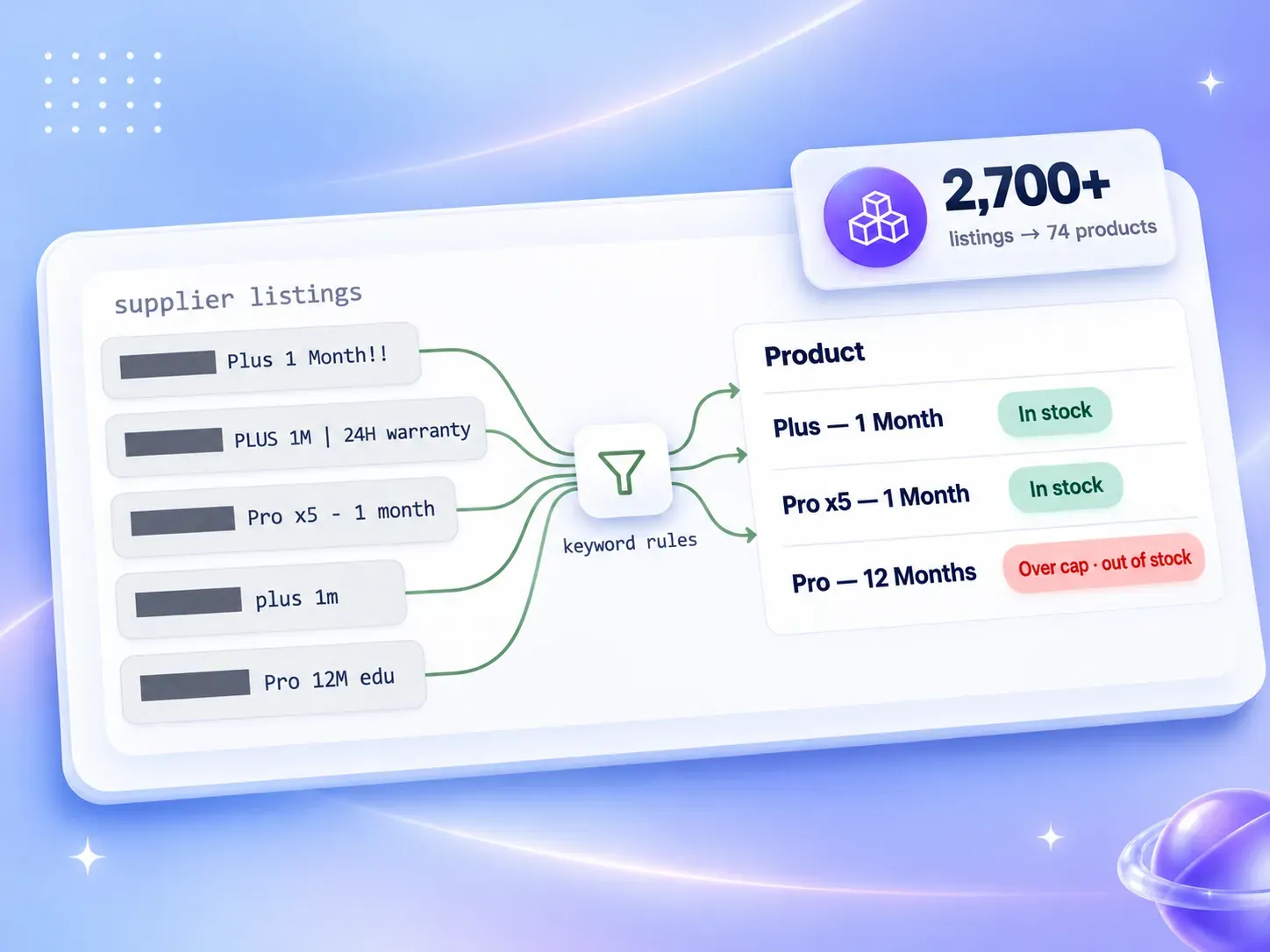
At a glance
The problem
DigitaVision sells digital subscriptions: AI tools, design software, streaming, VPNs. It buys them wholesale from Telegram seller bots. Each bot has its own catalogue, its own way of naming things and its own prices, and all three change daily.
Before this project, every product check went through one person on the team. A customer asked whether something was available. That person opened the bots one at a time, compared titles that described the same plan five different ways, worked out a price and replied. The customer waited. If that person was busy or offline, the answer waited too.
It also capped what we could sell. The supplier data was too unregulated to publish. The same plan was listed by several bots under different names. Durations and warranty terms were buried in titles. Typos were everywhere: the same plan turned up with accents, in capitals, with missing spaces and with doubled letters. Prices moved without notice. So we only showed customers the handful of products one person could keep accurate by hand.
The brief I set myself had four parts:
- Pull every bot into one place.
- Sort the mess into a clean catalogue of products and variants.
- Let stock follow the suppliers without anyone watching.
- Make sure nothing reaches a customer at a price that loses money.
Approach
I built the whole system alone, with Claude. I plan the work, make every product and architecture decision, review every change and test it myself; AI coding agents write most of the code.
My own time went mostly into planning. Before any code, I wrote out six milestones: foundation; database and access rules; supplier sync; admin panel; storefront; launch. Each later feature, like categories, pricing and supplier details, got its own plan document. Each plan listed numbered decisions and the open questions I had to answer before work could start, and split the work into phases small enough to review in one sitting. Every phase ended with a written review covering what it delivered, what the audit found, what got fixed and what was deliberately left for later.
Three decisions shaped everything else:
- A browse-only storefront, with no checkout. Customers browse the site, ask in live chat, receive a manual payment link, and the team delivers access. That let the catalogue ship in weeks. Ordering can be designed properly once it’s worth it, rather than guessed at now.
- Supplier data never reaches a customer directly. Raw listings are visible to admins only, and the database enforces that, not the UI. The storefront reads one narrow function that returns published variants, their prices and a yes-or-no stock flag. A test fails the build if that function ever gains a field.
- A failed sync is not an empty catalogue. A supplier’s snapshot is applied only after the whole response validates. A failure keeps the last good data. A listing not seen in a successful sync for 48 hours stops counting as stock.
Architecture
Seller bots
8 Telegram connections
Own API, prices, naming
Sync
Daily schedule + Sync now
Whole snapshot or nothing
Supplier listings
2,700+ listings
Admin-only, never public
Keyword rules
Listing → product → variant
Preview, then confirm
Storefront
Published variants only
In stock or out, nothing more
Pricing guard
Supplier cost against a cap
Over the cap → out of stock
Admin tools
Stock Lookup · delivery card
Supplier terms and history
How a customer buys today
- Customer browses
- Asks in live chat
- Manual payment link
- Access delivered
The app is Next.js on our own server behind nginx. GitHub Actions deploys it: the pipeline runs the checks, ships the build, polls a health endpoint for a minute, and rolls back to the previous release on its own if the new one doesn’t answer. Supabase holds the database, the admin sign-in, the supplier keys (encrypted in its vault) and the sync function. A scheduled job runs the full sync daily, and any admin can sync a single bot on demand.
The admin panel is one page, but every section, product, variant, tab and filter lives in the address bar. A refresh, the Back button or a link sent to a teammate lands exactly where you were. Unsaved edits ask before they’re thrown away.
Sorting the listings into a catalogue
I started with a read-only export of every listing the bots had sent in the previous 48 hours: 775 listings from 7 connections.
My first proposal was 81 products in 14 categories, each with keyword rules. Simulated against the real export, the rules placed 763 of the 775 listings with zero conflicts. Then I cut it down. I dropped whole groups we didn’t want to sell, and merged related products into one product with tier and duration variants. The result was 51 products, 237 variants and 9 categories. All of it was seeded as unpublished drafts, so nothing went public without review.
The catalogue has grown since. Today 8 bots send 2,700+ listings, sorted under 74 managed products, and 41 of those are live.
Plus 1 Month!! (full warranty)
plus1monthfullwarranty
Product › Plus — 1 Month
PLUS 1M | 24H warranty
plus1m24hwarranty
Product › Plus — 1 Month
Pro x5 - 1 month
prox51month
Product › Pro x5 — 1 Month
Promo Code — 1 Year
promocode1year
Excluded › promo codes
Each rule can match any keyword, match all of them, or exclude some, and runs against the normalised title. Normalising is what makes a title in capitals, one with accents and one full of stray punctuation comparable. It also creates traps, because every keyword becomes a substring search. Short keywords are the danger: “pro” also matches “promo”, and “edu” hides inside “reduced”. Every keyword was checked against all the real titles to avoid traps like these.
Rules are powerful, so changing one is deliberately slow:
- Editing a rule changes nothing. Preview changes lists every listing the new rules would assign, move, leave unmatched or put in conflict, with its supplier price and the reason.
- A preview goes stale. It expires after 15 minutes and carries a fingerprint of every product, rule, bot and listing it looked at. If any of them changed since, Confirm refuses.
- Conflicts and unmatched listings get their own queues in a Product Distribution screen. A person can Assign & lock a listing, and rules never override that decision.
- Every assignment, move and lock is in a permanent audit history.
Categories got the same treatment. They started as free text on each product, where one typo created a new public category. They became managed records with an explicit order and a hidden holding category for anything not yet sorted.
The variant bug
The first model assigned listings to a product, not to a plan. So a product’s Pro plan showed as in stock whenever any listing for that product was, even with every Pro listing sold out. The fix was variant stock rules, in the same shape as product rules, which decide which of a product’s listings count toward each variant’s stock. A product’s rules still decide where a listing belongs. A variant’s rules only decide what it counts.
Stock without anyone watching
After every successful sync, the database redistributes listings and recalculates stock in the same transaction. A listing counts toward a variant’s stock only if all of these hold:
- its bot is enabled;
- its assignment is enabled;
- the supplier says it’s available;
- it appeared in a successful snapshot within the last 48 hours.
An hourly sweep expires anything stale, even if the sync itself stops running. If redistribution fails, the sync still succeeds and is marked distribution needs attention. A sorting problem never throws away fresh supplier data.
For the question that used to need one person, there’s Stock Lookup. An admin types a product name, and every enabled bot is searched live and in parallel:
- Time limits: 10 seconds per bot, 20 seconds overall.
- Failures stay contained: a slow or failing bot can’t lose the others’ results.
- No collisions: a bot that’s in the middle of a regular sync is marked busy and skipped.
- Read-only: a lookup never touches the catalogue.
- Shared: only one lookup runs at a time across the whole system, and its results stay in a history every admin can see for 30 days.
Prices that can’t lose money
This was the hardest product problem in the build. Supplier cost, the official price and what customers will actually pay a reseller have no fixed relationship. For some plans the supplier cost is a tiny fraction of the official price; for others it’s most of it. The binding number is usually the third one, what the market accepts. No single markup, and no “X% below official” rule, fits both kinds of plan.
So prices stay manual. An admin sets a fixed selling price for each variant, and the system guards the margin underneath it.
Cheapest in-stock supplier cost →
Healthy
Nothing to do
Near the cap
Dashboard warns
Over the cap
Out of stock, automatically
The cap
Selling price minus a minimum profit in dollars, or an override set by hand. The alert zone is a share of the cap. When the cost drops back under the cap, the variant comes back in stock on its own.
What wins
- 1Variant Force In / Out
- 2Product Force In / Out
- 3Supplier stock, and not over the cap
- Cost is the cheapest eligible, in-stock supplier listing. It’s computed in one function, so warranty can become part of that choice later without touching the guard.
- Listings priced in other currencies are left out of the cost and counted on the dashboard, never guessed at.
- Suggested prices start from the 30-day median cost, weighted by how long each cost lasted (history only records changes). They apply a sliding markup, stay above cost plus the minimum profit, are capped at a share of the official price and are rounded to a .99 ending. When the floor is above the cap, the suggestion says no profitable price instead of offering a bad one. Nothing is applied automatically.
- The storefront shows the official price struck through, with “Save Y%” rounded down.
The rollout was the part I was happiest with. The guard first ran in monitor mode: it computed every cost and state, warned on the dashboard and blocked nothing. On day one the dashboard showed 174 published variants without a confirmed price. Enforce, which hides unpriced variants and applies the cap, is switched on only once that count reaches zero. Rolling back is switching the mode back, with no migration.
Building it also surfaced a real problem. When the catalogue was seeded, the draft seed filled every price with the lowest supplier cost as a placeholder. The live storefront was quietly showing frozen costs as prices. Now a price only counts once an admin confirms it, and any write that changes a price without a new confirmation clears that confirmation automatically.
The trade-off I accepted: suppliers sync once a day, so a variant can sell above its cap for up to a day. Before an urgent price edit, an admin runs Sync now.
Adding a supplier without writing code
Supplier integration went through three generations:
- A hand-written adapter for the first supplier. That supplier changed its authentication and its response format before the milestone was even closed.
- A configurable form for simple supplier APIs: one GET endpoint returning JSON.
- Supplier contracts as data. An admin describes a supplier’s API in a five-step wizard: identity and keys; endpoints; product mapping; guardrails; review. There’s no raw JSON editor and no code.
A contract goes live in four steps:
Step 1
Draft
Saved as an immutable revision
Keys go to a vault, not the document
Step 2
Live preview
Reads the real catalogue once
Issues a 15-minute, single-use receipt
Step 3
Validated
Consumes that exact receipt
Still changes nothing live
Step 4
Active
One switch, all or nothing
Refused while a sync is running
Rollback
Creates a new revision that copies an older one. History is never edited.
Drift block
A snapshot that drops too many products or changes shape is quarantined. The last good catalogue stays.
The details that make this safe enough to hand to an admin:
- Keys never sit in the contract. They live in the encrypted vault. On every save, the system checks that no key value appears anywhere in the document, including inside field names.
- Previews can’t be pointed at the internal network. A preview resolves the supplier’s address once, refuses private addresses, keeps that exact address for the whole connection and follows no redirects. It’s capped at 25 pages, 10,000 products, 16 MB and 45 seconds.
- Money is explicit. Every price declares its currency and how many decimal places it uses. Without that, a supplier pricing in a zero-decimal currency next to dollar prices would be off by a factor of a hundred. An unknown currency blocks the preview, and USD and USDT are never treated as the same thing.
- Lost responses don’t cause duplicates. Every lifecycle action carries a unique ID. If the response is lost, the admin panel can recover what actually happened instead of retrying into a duplicate.
- Ordering is described, not enabled. An admin can describe a supplier’s order endpoint, and the wizard reports whether it’s ready. But a database constraint means an order command can only ever be prepared, never authorised. Real ordering waits until payment ownership is designed.
Delivering an order
Once checking stock was fast, delivery was the next bottleneck. What the customer needs to know is in each bot’s own text: login steps, what the warranty covers, what the customer must provide. It lived inside the bot.
- The sync captures it. For each listing it stores the description, the instructions, the delivery method, the customer requirement, the warranty and the plan length. The text is stored exactly as sent and cleaned on display, removing Telegram emoji codes and formatting. Several bots only state warranty in the title, so the sync parses it from there. It read 423 of 494 unique titles and left ambiguous ones alone.
- It flags risky lines before anything is copied. That covers links to a supplier’s own Telegram channel (forwarding those tells a customer who we buy from), wording meant for resellers, and refund promises. One click removes the Telegram links.
- It tracks supplier changes. When a supplier changes its terms, the previous version is kept for 90 days, with a line-by-line diff of what changed.
- It brings everything into one delivery card. Ctrl+K finds any variant. Its delivery card combines our own warranty, the saved delivery message and the steps from the cheapest in-stock listing into one customer message, copied with one click. Opened from a Stock Lookup result, it goes to the exact listing, matched by bot and product ID, never by title.
Supplier text is always rendered as plain text, never as HTML, so a hostile description can’t inject anything into the admin panel.
How it was checked
When an AI agent writes most of the code, the checking is the job. Every phase passed the same gate: format, lint, type check, unit tests, build, a scan of the built files for secrets, and a smoke test of the production bundle. By the latest release that meant 521 unit tests.
The database got more care than the code. All 67 migrations were replayed from scratch on a clean local PostgreSQL before any of them reached the real database. Each feature had acceptance scripts that ran inside a transaction and rolled back. For the parts that mattered, I broke the code on purpose to prove the test would catch it. The one irreversible migration, which dropped the old category column, was held back until the new storefront had been checked in a browser.
The audits found real things:
- A scheduled sync answered “OK” even when every supplier failed, which would have silenced the scheduler’s failure alerts. It now returns an error status for any partial or failed run.
- The database’s default permissions exposed admin functions to anonymous visitors. They were revoked, and new functions now start with no access.
- A database rule meant to require a value passed silently when the value was missing. A null slips through a SQL
CHECK. Every rule now tests for that explicitly. - Archiving a category at the same moment as moving a product into it could leave a live product in a hidden category. I reproduced it with two connections and fixed it with a row lock.
- The test harness itself was wrong. It faked the signed-out role in a way production never does, which is why one test suite had always failed for an unrelated reason.
Not everything was checked by machine. Screens behind the admin sign-in were checked by me in the browser after each deploy, because the agent couldn’t sign in.
Outcomes
Customers now see far more of what we can actually sell. Those are products we couldn’t list before, because nobody could keep the data accurate by hand.
- Stock follows the suppliers on its own. A plan that sells out at every bot leaves the storefront without anyone noticing first.
- Costs are guarded. A variant whose cost rises past its cap goes out of stock, and comes back when the cost drops.
- Availability no longer depends on one person. Any admin can answer “is it in stock, and from whom?” in under 20 seconds.
- Delivery is one copy away. The supplier’s steps for the exact listing we bought from are combined into one message.
In numbers: 2,700+ supplier listings from 8 seller bots, sorted under 74 managed products, 41 of them live on the storefront. The first sort turned 775 listings into 51 products and 237 variants. The build took 67 database migrations and 521 unit tests, over about 12 weeks.
The honest limits:
- There’s no checkout yet. Payment and delivery are still manual, by design for now.
- Prices sync once a day.
- Supplier costs in other currencies aren’t converted, so they don’t count toward the guard.
- Supplier text is only as good as the bots make it. The admin panel can clean it and flag problems, but it can’t make it accurate.
What I’d do differently
Treat the supplier API as data from day one
The first adapter was written by hand for one supplier, and that supplier changed its authentication and its response format before the milestone closed. It took three generations to reach supplier contracts as data: a fixed adapter, a configurable form, then the full contract wizard. A new supplier can now be added through the third without touching code. Starting there would have saved building the first two.
Look at all the real data before designing the model
My first catalogue design had 81 products in 14 categories, and it was redone once I could see all 775 listings side by side. The variant stock bug came from the same place: the first model assigned listings to products, which worked while the catalogue had four products with one plan each, and it was wrong the moment a product had more than one plan.
Build the local test database before the first migration
When the categories work started, every verification script in the project pointed at the production database. Running them would have tested against live data. I built a harness that replays every migration on a clean local PostgreSQL halfway through a feature. Its first run caught a migration that would have failed on deploy, and it should have existed from milestone one.
Next case study
Support desk & AI agent — another system built with AI agents